Automated Invoice Approval Processing in SharePoint
Automating invoice approvals in SharePoint—powered by Microsoft Power Automate—streamlines document routing, ensures compliance, and eliminates manual bottlenecks. Learn how organisations use SharePoint document libraries, approval workflows, and ERP integration to modernise accounts payable processes.
- Automated document routing & metadata-based approval flows
- Email and portal-based invoice capture into SharePoint libraries
- Mobile-friendly, multi-level approval automation
- Integration with ERPs for payment posting
- OCR and templating options for advanced AP automation
1. Why Automate Invoice Approvals in SharePoint?
A SharePoint approval workflow provides a structured and trackable way to rouinvoices for validation before payment. This automated process reduces manual follow‑ups, improves compliance, and keeps all invoice activity visible across the business. Modern SharePoint workflows rely on Power Automate and support multi-level, parallel, or conditional routing based on metadata such as department or invoice type.
2. How Invoice Automation Works in SharePoint + Power Automate
Step 1: Invoice Receipt
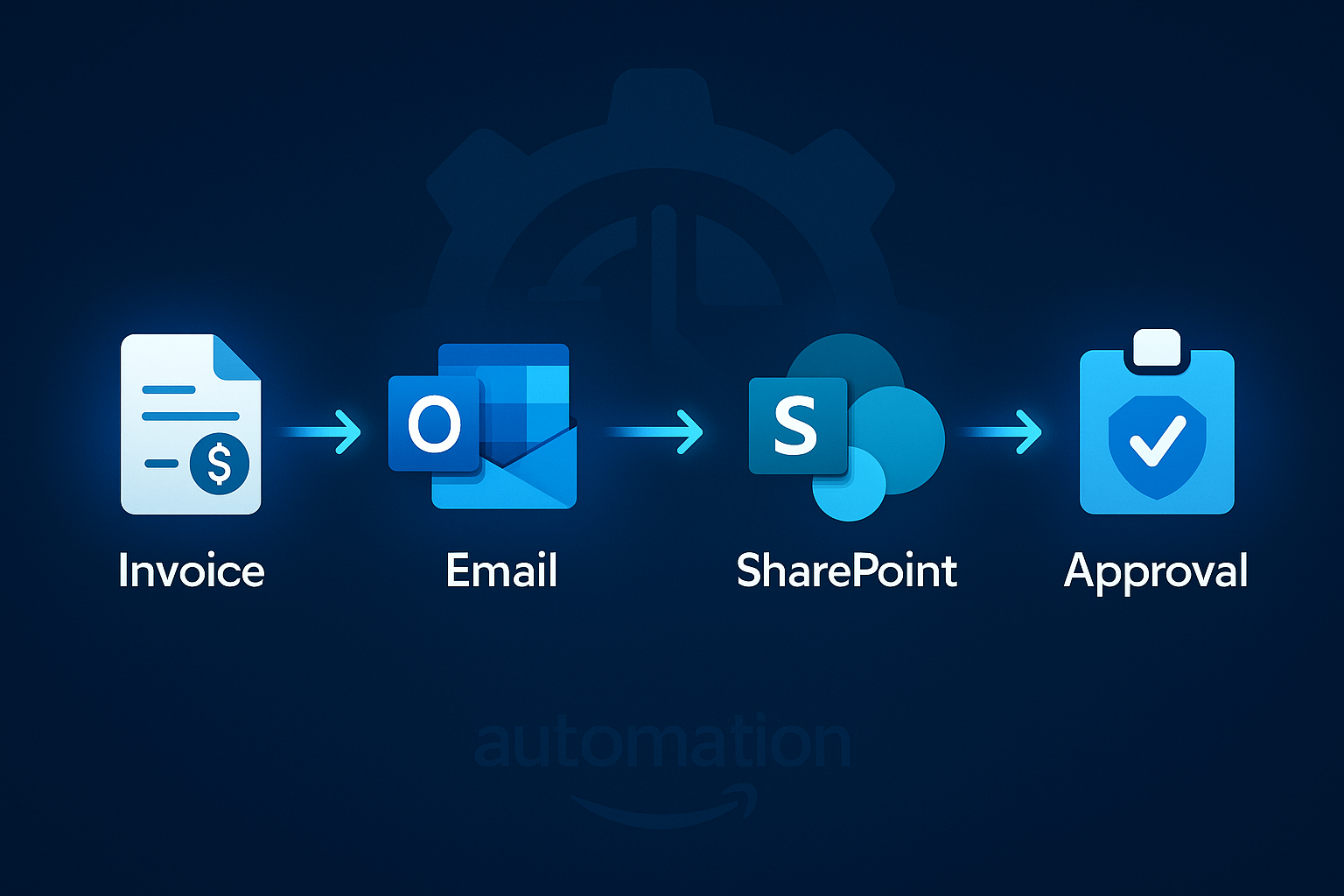
Instead of invoices sitting in a single inbox, Power Automate can automatically move emailed invoices (e.g., invoices@company.com) into a SharePoint document library. This ensures visibility, version control, and consistent storage for all received invoices.
Step 2: Approval Workflow
Once received, Power Automate assigns tasks to reviewers, sends mobile/email notifications, and tracks approval status. Reviewers can approve from email, mobile devices, or Teams. This eliminates bottlenecks and provides real-time status updates.
Step 3: ERP Integration & Payment
When invoices are approved, integrations like DynamicPoint EasyAP365 route data directly into ERP systems for payment processing. This live integration supports PO and non‑PO invoices and eliminates the need for duplicate data entry.
3. Benefits of Automated Invoice Approval
Automation removes repetitive tasks, minimises errors, and enforces business rules consistently. By using Power Automate, SharePoint, and AI‑driven OCR, organisations can extract key invoice data, standardise routing, and achieve secure, paperless invoice processing right within Microsoft >
4. Practical Use Cases
Multi‑department approvals: Invoices route automatically based on metadata such as cost centre, vendor, or invoice value.
Vendor onboarding & check requests: Power Apps and Power Automate can manage auxiliary workflows like vendor setup or non‑invoice payment requests.telligence extracts invoice data, eliminating manual entry and reducing mistakes.
5. Step-by-Step: Building an Invoice Approval Flow
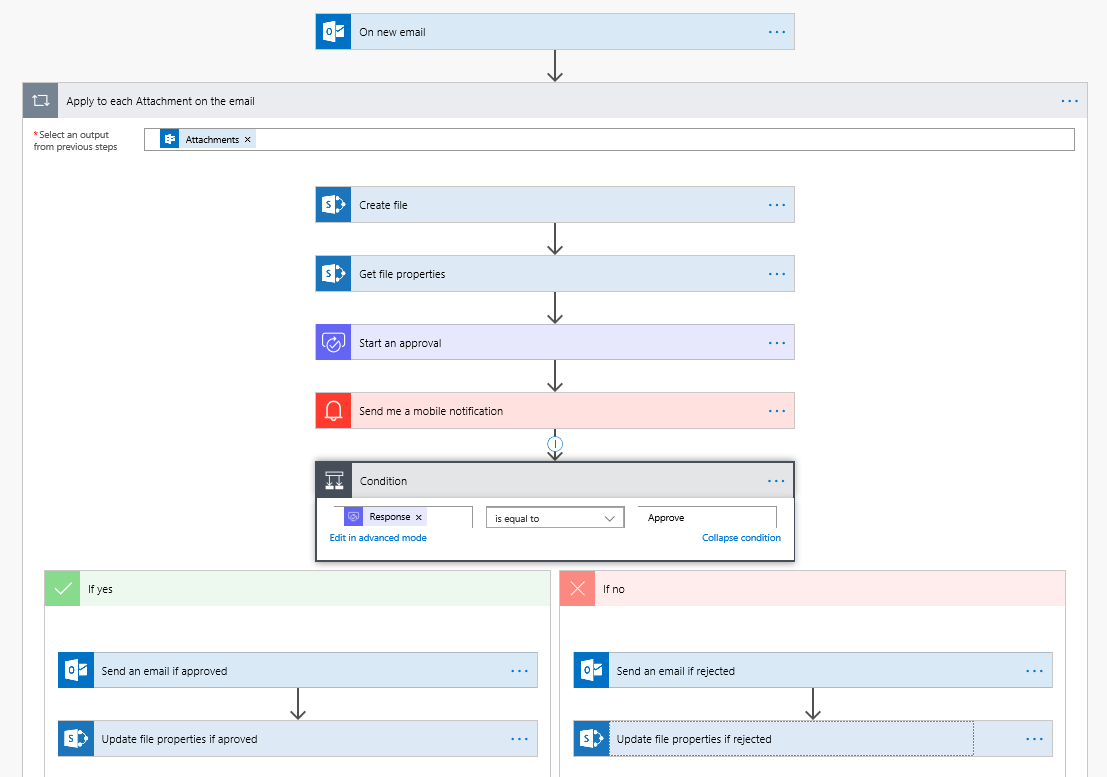
1. Set up a SharePoint document library
Configure required metadata—vendor, department, amount, approver—so invoices route correctly.
2. Create a Power Automate flow
Choose a prebuilt template for invoice automation or build a custom flow triggered by new document creation. Add actions for notifications, approvals, and status updates.
3. Implement conditional logic
Route invoices over certain values to senior approvers or send parallel approvals to finance and department heads.
4. Integrate with your ERP
Use EasyAP365 or native connectors to push approved invoices into your ERP for posting, eliminating manual re-entry.
5. Add monitoring & dashboards
Use Power BI to track approval times, bottlenecks, and invoice volumes for process optimisation.
6. Deeper Dive: How ERP Integration Enhances Invoice Automation
One of the most powerful benefits of automating invoice approvals in SharePoint is its ability to integrate directly with ERP systems. Once an invoice has been captured in SharePoint and routed through Power Automate for approval, it can be pushed straight into your finance system for payment processing—without any manual re‑entry. This significantly reduces errors, accelerates payment cycles, and ensures complete data consistency across platforms.
Real-time invoice creation:
Solutions such as DynamicPoint’s EasyAP365 use Microsoft-provided ERP APIs to create the invoice transaction inside your ERP the moment approval is completed. This means no syncing, batching, or exporting—just instant posting to your financial system.
Supports both PO and Non‑PO invoices:
The integration intelligently matches purchase order invoices to existing POs in the ERP, while non‑PO invoices are coded directly to the correct general ledger accounts. This eliminates manual matching and ensures compliance with purchasing workflows.
OCR + metadata mapping for seamless posting:
With built‑in OCR tools (such as AI Builder or Document Intelligence), key invoice information—vendor name, dates, line items, totals—is extracted and mapped to ERP fields. This reduces processing time and improves data accuracy before posting.
Vendor validation and duplicate checking:
ERP integration allows the system to validate vendor data, confirm GL coding accuracy, and check for duplicate invoices before creating records in the ERP, ensuring financial integrity and reducing fraud risk.
Multi‑system compatibility:
EasyAP365 supports a wide range of ERP systems—including Dynamics 365 Finance, Dynamics GP, Dynamics AX, Dynamics NAV, and more—making it suitable for organisations using different Microsoft ERP products. It leverages live web services for seamless communication regardless of the backend system.
Fully SharePoint‑based document visibility:
All invoice files remain stored in SharePoint, ensuring full transparency. Users can drill down from ERP transactions back to the originating invoice documents and approvals, creating an end‑to‑end audit trail.
End-to-end automation flow:
- Invoice captured (email, portal, mobile, or upload)
- Stored in SharePoint with metadata
- OCR reads invoice and populates fields
- Power Automate routes invoice for approval
- ERP API posts approved invoice for payment
- Full visibility maintained across SharePoint + ERP
7. Real-Life Business Examples of Automated Invoice Approval in SharePoint
Automated invoice approval workflows are used across many industries to streamline operations, reduce manual workload, and improve financial accuracy. Here are several practical examples of how organisations use SharePoint and Power Automate to transform their accounts payable processes.
Example 1: Manufacturing — Multi-Level Cost Centre Approval
A mid-size manufacturing company receives hundreds of supplier invoices each month. Incoming invoices are emailed to a shared inbox, where Power Automate automatically moves them into a SharePoint library. Metadata determines routing rules—for example, invoices under £5,000 automatically go to the production supervisor, while higher amounts escalate to the finance manager. Approved invoices are posted directly into the ERP system for payment, removing delays and manual data entry errors.
Example 2: Professional Services — Client Billable Expense Processing
A consultancy uses SharePoint to manage client-billable expenses. Consultants upload receipts via a mobile Power Apps form, tagging each item with a project code. Power Automate routes these to the project manager for approval, and approved invoices flow directly into the finance billing system. This ensures timely, accurate client invoicing and prevents revenue leakage.
Example 3: Property Management — Contractor Invoice Validation
Property managers receive service invoices from contractors for repairs and maintenance. Contractors upload invoices through a SharePoint-based vendor portal. Power Automate verifies whether the invoice is tied to an existing approved work order, then sends it to the property manager for validation. Approved invoices go directly into the property management ERP, reducing disputes and improving service turnaround times.
Example 4: Retail — High-Volume Store Invoice Handling
A retail chain with dozens of locations manages large volumes of recurring invoices such as cleaning, utilities, and logistics. Store managers upload invoices into SharePoint, where OCR extracts store number, vendor, and amounts. Power Automate routes the invoice based on budget thresholds. Approved invoices create ERP payables automatically, while Power BI dashboards help head office monitor store‑level spending in real time.
Example 5: Construction — Project-Based Routing
Construction firms need strict cost control and contract compliance. Invoices emailed by suppliers are automatically tagged with project IDs using metadata rules in SharePoint. Site managers validate the work, and if invoices exceed budget or fall outside contract scope, Power Automate escalates them to commercial directors. All documents are stored in project SharePoint sites, ensuring full audit readiness.
Example 6: Nonprofit — Grant Allocation & Compliance Tracking
Nonprofits often need to track invoice spending against individual grants. SharePoint requires users to select a grant code when uploading invoices. Power Automate checks whether the invoice aligns with grant budgets and routes it to the grant manager and finance for approval. ERP integration ensures accurate grant reporting, while Power BI gives trustees transparent oversight of fund utilisation.
Reflective IT Tip
Start small by automating email‑to‑SharePoint invoice capture. Once stable, extend your workflow with OCR, ERP integration, and conditional approvals for full AP automation.
Ready to Automate Your Invoice Workflow?

Reflective IT specialises in designing intelligent Microsoft 365 workflows that eliminate manual admin and streamline your accounts payable process. Contact us today to modernise your invoice approval system.
📞 0207 317 4535 | 📧 support@reflectiveit.com