A Growing Threat Inside Your Trusted Workspace

Microsoft Teams is now at the centre of how modern businesses communicate. It is where conversations happen, decisions are made, and collaboration moves quickly. That same speed and familiarity are exactly why attackers are targeting it.
Recent reports highlight a rise in impersonation attacks within Teams, where attackers pose as trusted colleagues to deceive users into handing over access or sensitive data.
These attacks are particularly dangerous because they exploit trust. Unlike traditional phishing emails, Teams messages feel immediate, familiar, and internal - making them far more likely to bypass suspicion.
What is a Microsoft Teams impersonation attack?
An impersonation attack occurs when a cybercriminal contacts a user while pretending to be someone within the organisation, often IT support, finance or leadership.
These attackers often request actions such as:
- Clicking on a malicious link
- Sharing their screen or granting remote access
- Providing login credentials or sensitive information
In real-world scenarios, attackers guide users step by step through actions such as launching remote support tools, allowing them to gain direct access to systems.
Once access is granted, the attacker can move quickly across systems, access data, and strengthen their foothold in the environment without raising immediate suspicion.
Why Microsoft Teams is becoming an attack target
Attackers are not replacing phishing. They are evolving it. Microsoft detected approximately 8.3 billion phishing emails in the first quarter of 2026 alone, showing just how active and persistent these threats still are.
As organisations have strengthened email security, attackers are shifting to channels where trust is higher and responses are quicker.
Teams is particularly attractive because:
- External users can contact internal staff
- Messages feel informal and conversational
- Users are more likely to respond quickly without verification
In many cases, attackers only need a few user-approved actions to establish a foothold and escalate their access within the Microsoft 365 environment.
What happens if an attacker gets access?
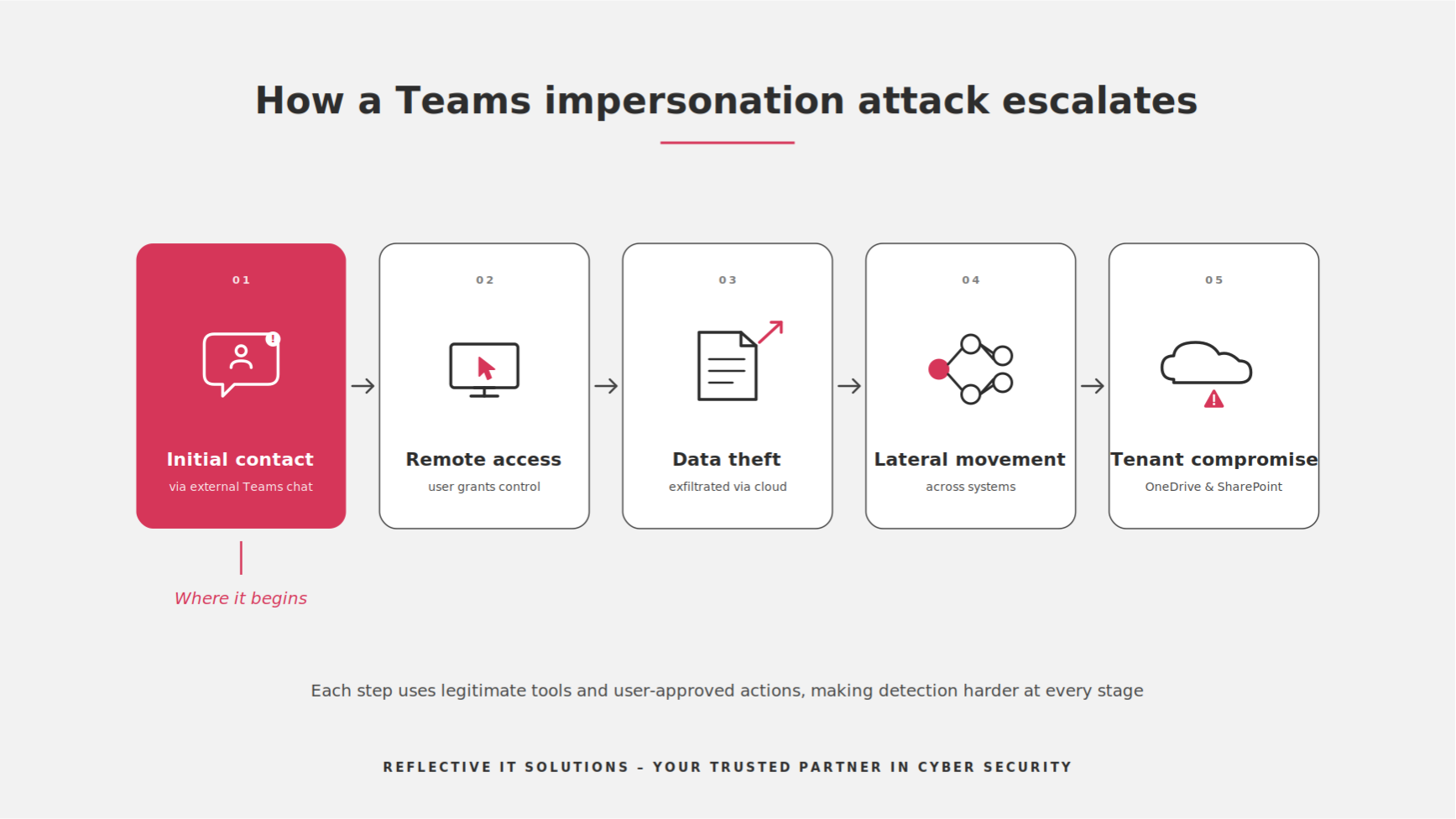
The impact of a successful Microsoft Teams impersonation attack can be signification and far-reaching. Once inside, attackers might:
- Data theft and exposure of sensitive business information
- Access to email, files, and internal systems
- Lateral movement across the organisation
- Potential full tenant compromise or ransomware-style lockouts
Microsoft has observed attackers using legitimate tools and administrative processes after gaining access, allowing them to blend into normal activity and avoid detection. In more advanced cases, this can lead to account takeover, data encryption in services like OneDrive and SharePoint, or complete system lockouts. This type of compromise can take significant time and resource to recover from, especially if attackers gain administrative access.
Key warning signs to look out for
Educating users is one of the most effective ways to reduce risk. Here are some common red flags:
- Unexpected messages from IT, finance, or senior staff
- Urgent or pressured requests to act quickly
- Requests for passwords, MFA codes, or screen sharing
- External accounts (often labelled “External”) posing as internal users
- Links or attachments that seem unusual or out of context
Remember: attackers rely on speed, urgency and familiarity. If something feels off, it is worth stopping and checking.
How to protect your organisation
Protecting against Microsoft Teams impersonation attacks requires a layered approach combining technology, configuration, and user awareness:
- Restrict or carefully manage external Teams access
- Implement strong identity protections such as MFA
- Deploy Microsoft Defender for Office 365 / XDR for visibility
- Provide regular security awareness training for staff
- Encourage a “verify before you trust” culture for all requests
Organisations must treat Microsoft 365 as critical infrastructure, with the same level of governance and protection as any core business system.
How Reflective IT Can Help
If someone on Teams asks for access, credentials or urgent action, stop and verify the request through another channel. Trust should never replace verification.
Need help reviewing your Microsoft 365 security or understanding how exposed your organisation is? Speak to our team.
📞020 3820 1080 | 📧 support@reflectiveit.com