Microsoft is retiring Outlook Meeting Insight, the feature that surfaces files and emails inside your calendar events, by early September 2026. It’s being replaced with a Copilot-powered feature called “Prepare for this meeting,” which requires a paid Microsoft 365 Copilot licence. If your business currently uses Outlook Meeting Insight, here’s what’s actually changing and whether you need to do anything about it.
Quick answer: what’s happening to Microsoft Outlook’s Meeting Insight
If you want the short version, here is who each option tends to suit:
- What’s changing: Meeting Insight, the free feature that surfaces files and emails in your calendar events, is being retired.
- When: Removal starts mid-August 2026 and completes by early September 2026.
- What replaces it: “Prepare for this meeting,” a Copilot-powered summary of relevant tasks and documents.
- The catch: the replacement only works if your business has a Microsoft 365 Copilot licence. Meeting Insight was free.
- Do you need to do anything? No urgent action. Let your team know it’s disappearing, and use it as a prompt to decide whether Copilot licensing is worth it for your business.
What is Meeting Insight?
Meeting Insight is a free Outlook feature that automatically surfaces relevant files and emails inside your calendar events. Open a meeting in your calendar, and Outlook pulls up the documents and messages tied to that meeting, without you having to search for them.
What is happening to it?
Microsoft is retiring Meeting Insight. Once it’s gone, those files and emails will no longer appear automatically in your event details.
Who does this affect, and on which platforms?
This affects anyone currently using Meeting Insight, and any organisation with it enabled. The removal spans every version of Outlook, not just one: Outlook on the web, the new Outlook for Windows, Outlook for Mac, Outlook Mobile, and Meeting Insight as it appears in Microsoft Teams. If you use any of these to view meeting invites, the change applies you.
The replacement, “Prepare for this meeting,” is only available to users who already hold a Microsoft 365 Copilot licence. Everyone else simply loses Meeting Insight with nothing in its place.
When is Outlook Meeting Insight being removed?
Mi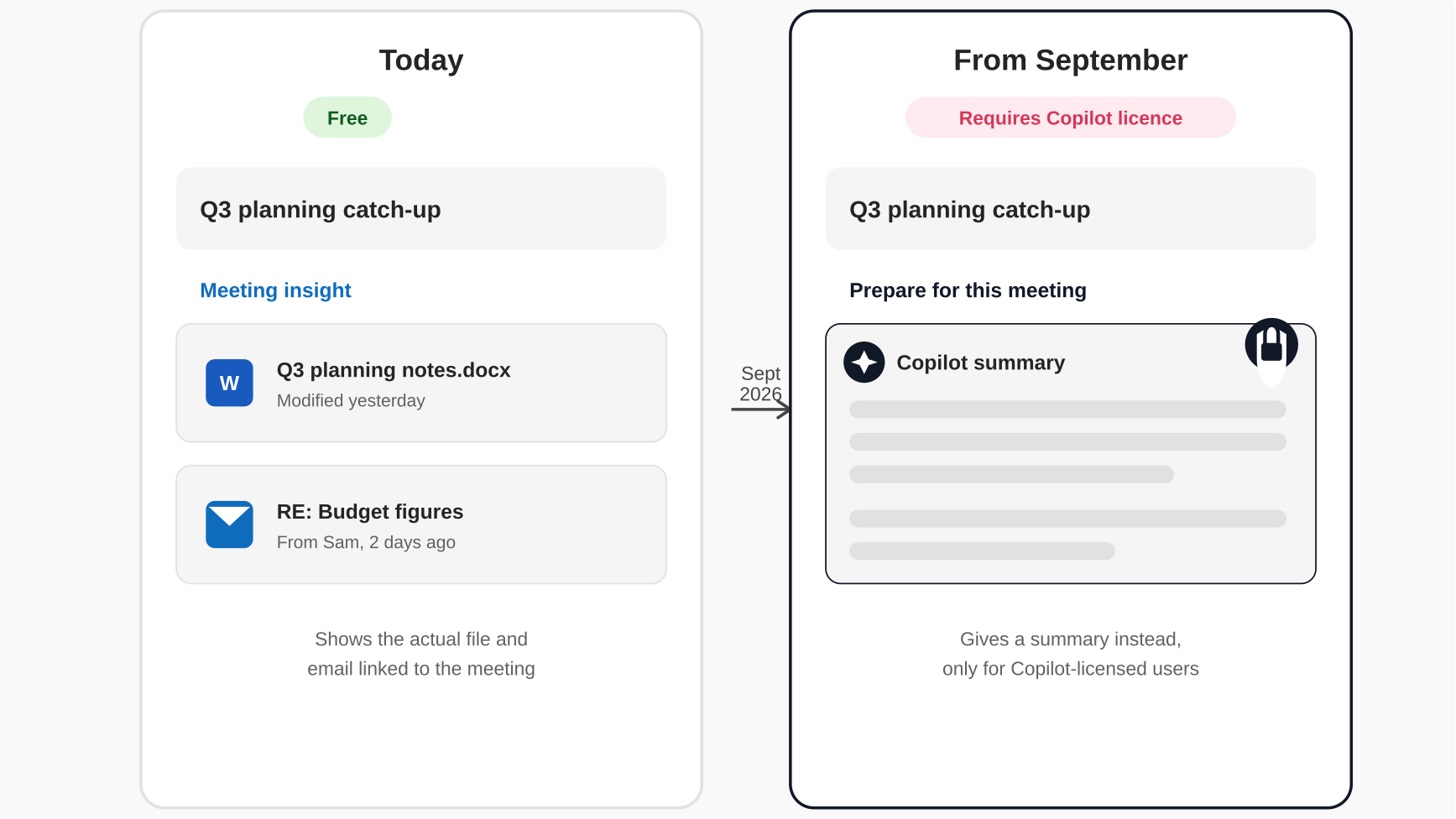 crosoft has confirmed the removal starts mid-August 2026 and completes by early September 2026. There’s no exact date within that window yet. Windows Latest reported on the announcement in more detail, including why the original feature caused confusion for some users in the first place.
What is replacing Outlook Meeting Insight?
Microsoft’s replacement is called “Prepare for this meeting.” Instead of showing you the actual files and emails linked to a meeting, it generates an AI summary of relevant tasks and documents.
It’s worth being clear about the difference. Meeting Insight showed you the source material. “Prepare for this meeting” gives you Copilot’s summary of it. A summary can be useful, but it isn’t the same as having the original document or email in front of you, particularly if accuracy matters for what you’re preparing for.
One reassuring detail: the Copilot summary still respects each person’s existing access permissions. It only draws on content that user could already see, so it will not surface anything they weren’t already entitled to view. If your business already has Copilot and wants to get more out of it, our Copilot tips and tricks guide is a good place to start.
Do I need a Copilot licence to use the replacement?
Yes. Unlike Meeting Insight, which was free, “Prepare for this meeting” only works if your business has a Microsoft 365 Copilot licence. This is part of a wider pattern from Microsoft. Back in April 2026, Copilot Chat in Word, Excel, PowerPoint, and OneNote also moved behind the same paywall. Features that used to be free are increasingly only available to Copilot-licensed users.
Do I need to do anything before September?
No urgent action is needed. Microsoft has confirmed there’s nothing to configure and no compliance impact. That said, it’s worth doing three simple things before the change lands:
- Let your team know. If people rely on Meeting Insight day to day, they’ll notice when it disappears. A quick heads-up avoids confusion or support tickets later.
- Update any internal documentation that references Meeting Insight, so training materials and how-to guides stay accurate.
- Decide if Copilot is worth it for your business. If losing this feature is a genuine loss for your team, it might be the right moment to weigh up whether a Microsoft 365 Copilot licence makes sense more broadly, rather than reacting to one feature at a time. If you’re not sure which Microsoft 365 plan your business is even on, our Microsoft 365 Business Plans Compared guide explains where Copilot Chat is included by default and where the paid Copilot add-on sits on top.
What does this mean for your business?
This isn’t a security issue or a change that needs technical work from your IT provider. It’s a reminder that Microsoft is steadily moving useful features behind Copilot licensing, and it’s worth having a plan rather than being caught out feature by feature.
Speak to Reflective IT about Microsoft 365 changes like this one
Microsoft changes its licensing and features constantly, and it’s rarely communicated clearly to the businesses affected. As part of our Managed IT Support, we keep track of these changes on our clients’ behalf, assess the impact on their business, and advise on whether it’s worth acting. If you want a clearer view of what’s changing in your Microsoft 365 environment, or a straight answer on whether Copilot is worth the investment, speak to our team.
Reflective IT Solutions Ltd — Your Trusted Partner in Managed IT